The prompt
Your call guide in text form: who is calling, what it is about, what should be asked, what must never be said. Change it and the next conversation changes.

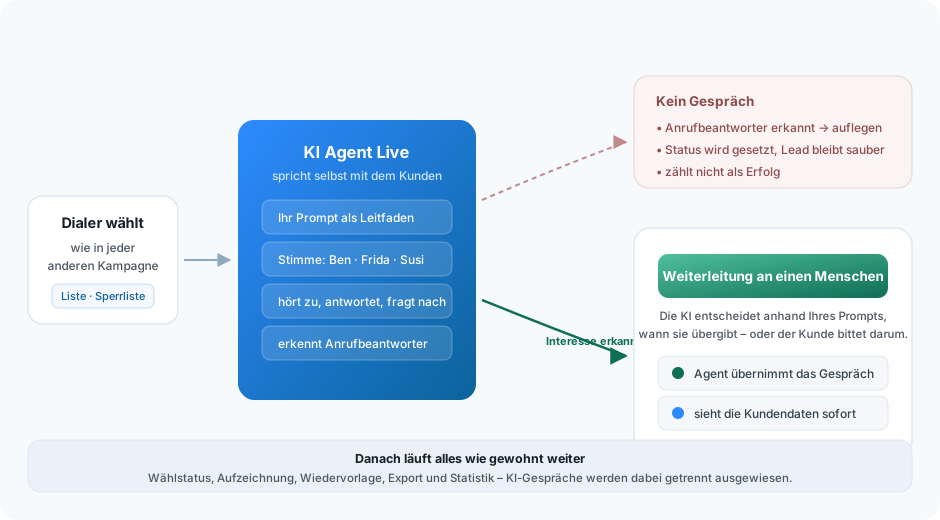
Not a tape of announcements but someone to talk to: the AI agent calls through the same campaign, speaks with a natural voice, follows your guide and hands over to one of your agents as soon as things get interesting.
What you set
You do not give the AI program code but an instruction in plain language – plus a few hard limits it has to keep to.
Your call guide in text form: who is calling, what it is about, what should be asked, what must never be said. Change it and the next conversation changes.
Several voices in different languages are available, female and male alike. The voice belongs to the campaign, not to the system.
Does the AI speak first or the customer? With a fixed first sentence or freely phrased? May it be interrupted? And after how many seconds of silence does it start on its own?
A second instruction describes when a conversation counts as a success. The outcome follows from it – and with it your reporting.
A separate prompt defines when to forward to a human. Plus the destination number and the number to be displayed.
Maximum time with the AI, maximum total duration including the forwarding, minimum duration for counting as a success, and the time window in which the campaign runs automatically.
Pre-announcement
On request mmDial plays a fixed audio file before handing over to the AI – a greeting, a notice about recording, or the legally required information that an automated system is speaking.
You store the file and its length; optionally you also supply the spoken text in writing, so that the AI knows it when analysing the conversation and does not greet the person twice.
So that no AI conversation ends up on a mailbox, mmDial recognises recorded announcements – either only once the AI conversation is running or already while the call is being set up.
Which of the two detection methods suits you better depends on whether you play an announcement before handing over to the AI. We set that up together with you.
AI conversations run under their own marker. In the live view AI agents are counted separately from humans, and in the statistics a call only counts as successful if it was actually put through to the AI.
The average call time is now available for AI campaigns as well, in the live view and in the statistics. Before, it existed only per agent – and in an AI campaign no agent is on the phone.
So at any time you can see what the AI contributed – and what your agents did.
Everything else stays as it is
An AI campaign is a perfectly ordinary campaign with one switch flipped. Everything around it carries on unchanged:
So you can put the same lead stock through the AI first and then work the remaining records the classic way.
Honestly
For each campaign you store a time window. The campaign starts and stops by itself – nobody has to switch it on in the morning or off in the evening.
The feature is enabled per customer, as is the number of simultaneous AI lines. It depends on the plan and is not part of the standard plans; it is not available in mmDial Direkt.
The duty to disclose to the person called, the permitted calling hours and the rules on call recording all apply unchanged.
* We buy the AI functions in internationally, depending on the function you want – which provider is used follows from what your campaign has to be able to do. We tell you which ones apply in your case when the feature is enabled; the details of the processing are set out in the data processing agreement.
Frequently asked
It runs the outbound conversation itself. The dialler dials as it does in any other campaign; when somebody picks up, the AI agent takes over, speaks with a natural voice and follows the prompt you have stored. It listens, answers questions and decides, based on your instructions, when to hand over to a human agent.
A real conversation. The AI agent reacts to what the person called says rather than working through a fixed sequence of announcements. If you wish, a fixed announcement can be played before the handover to the AI – a greeting or a notice, for instance.
In two ways: either during the running AI conversation once the AI has taken over, or directly while the call is being set up – the latter also works when an announcement is playing first. You can store your own keywords that trigger detection, and others that deliberately must not trigger it, plus your own time limits for detection during call setup.
You define that in a separate prompt for the handover – for example: "As soon as the person shows concrete interest or asks for a member of staff." You store the destination number and, optionally, the number to be displayed. The agent taking over sees the customer data in their screen immediately.
That is up to you: for each campaign you store a time window, and the campaign keeps to it automatically – it starts and stops by itself, with nobody having to switch it on in the morning or remember it in the evening. So no AI campaign carries on at the wrong hour by accident.
In practice, no. It takes over the part that eats time and rarely closes – the first approach and the sifting. In return your agents get conversations where interest already exists. How many AI lines may run at once is agreed per customer.
The feature is enabled per customer and priced separately, because the effort depends on call duration and volume. Talk to us – we will work through an example for your use case.
Yes. If the person you are speaking to is talking to an automated system, that must be recognisable; the usual rules for telephone marketing and for recording calls continue to apply unchanged. We are happy to set up the prompt together with you so that the notice sits cleanly at the start of the conversation.
Write the prompt, choose the voice, define the handover, test it on a small list. Then you decide whether it pays off for you.
One cookie – for your choice of language
This site sets no analytics or advertising cookies. If you agree, we remember only the language you picked. If you decline, it follows your browser setting again on every visit. More in our privacy notice