A current browser
The administration and the agent desk run in the browser – on Windows, macOS and Linux. No installation and no Windows licence is strictly required.

mmDial is a hosted solution: the entire IT infrastructure sits in our data centre. All that stays with you are the workstations. This page describes what that means technically.
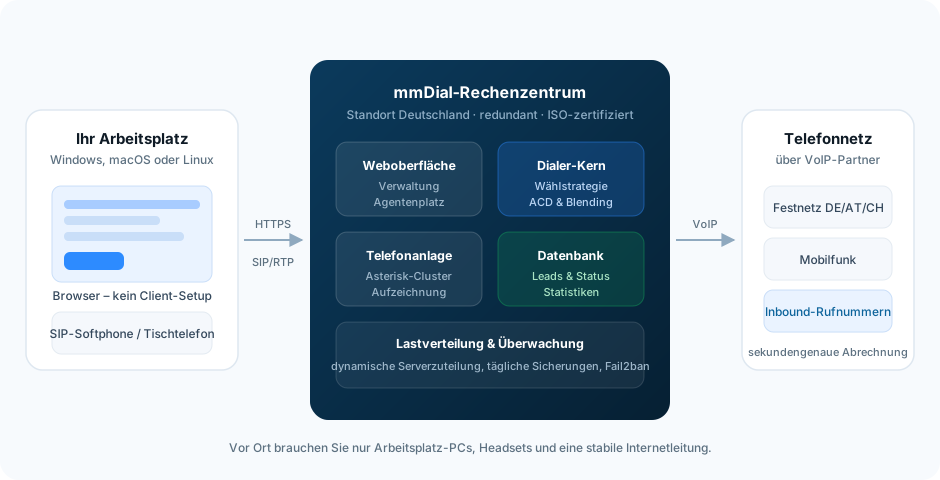
At the workstation
Deliberately little. Anyone already working with PCs and an internet connection usually has everything needed.
The administration and the agent desk run in the browser – on Windows, macOS and Linux. No installation and no Windows licence is strictly required.
The browser brings the voice connection with it: when signing in, the agent ticks Use integrated VoIP connection, and that is that. Anyone who prefers a SIP softphone or a desk phone can still use one.
Every simultaneous call takes up bandwidth in both directions. We help with sizing – which is well worth it especially for larger teams.
In the data centre
The web interface, dialler core, phone system and database run at our end. The load is spread dynamically across several servers; monitoring services step in before a bottleneck reaches the customer.
Telephony
The connection to the telephone network is made through voice-over-IP partners. Billing is to the second from the first second – not in started minutes.
Anyone keeping their leads in their own system used to have to ask what mmDial had made of them. Now mmDial speaks up by itself: per campaign you store rules that fire on a change of outcome or an edit to a lead.
Interfaces Comfort
Anyone already running a CRM wants to keep it. mmDial Comfort provides an HTTP API through which data can move in both directions. On top of that, external order forms can be embedded – then your system remains the leading source and mmDial merely supplies the call data.
Because requirements are rarely off the peg, we also develop campaign modules to order. Describe your process to us – we will tell you whether the standard covers it or what would be needed.
Discuss a connectionLegal
As the controller within the meaning of the GDPR, you decide on the purpose and means of the processing. That includes in particular:
This overview is not legal advice. If in doubt, speak to your data protection officer.
Bandwidth, devices, interfaces, migrating an existing stock – we are happy to clear that up beforehand.
One cookie – for your choice of language
This site sets no analytics or advertising cookies. If you agree, we remember only the language you picked. If you decline, it follows your browser setting again on every visit. More in our privacy notice